
Rugged Tablets for Public Safety: Choosing the Right Device
Public safety agencies face unique operational challenges that demand devices built to withstand harsh environments, heavy usage, and strict security requirements. Choosing the right rugged tablet can dramatically improve field efficiency, data accuracy, and officer safety. This guide provides a comprehensive framework for evaluating rugged tablets, covering durability, performance, security, connectivity, battery life, ergonomics, and total cost of ownership. By following these criteria, decision‑makers can align device specifications with mission‑critical needs and avoid costly mismatches.
Understanding Rugged Tablet Requirements for Public Safety
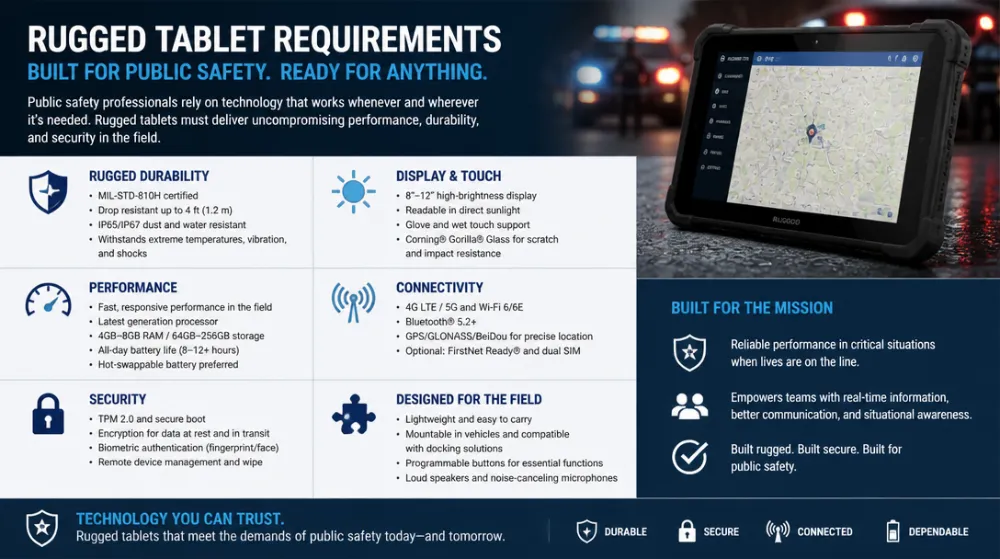
Public safety operations typically involve exposure to extreme temperatures, dust, moisture, drops, and vibration. According to a 2023 report by the International Association of Chiefs of Police (IACP), over 70% of agencies reported device failure in the field as a primary barrier to effective communication. Rugged tablets must meet defined environmental standards such as IP68 for dust and water resistance, MIL‑STD‑810H for drop and shock testing, and operating temperature ranges from -20°C to 60°C. These certifications are not optional; they ensure that the device remains functional during emergency responses, disaster relief, and routine patrols.
Beyond environmental durability, public safety tablets must support mission‑critical software ecosystems, including CAD applications, GIS mapping, evidence‑capture platforms, and secure communication apps. Performance metrics such as processor speed, RAM capacity, and storage I/O influence the ability to run multiple demanding applications simultaneously without lag. Selecting a device with a qualified processor (e.g., Intel Core i5 or AMD Ryzen 5) and at least 8 GB of RAM is a baseline for modern public safety workflows.
Key Evaluation Criteria
Durability and Certification: Verify that the tablet meets at least IP68 ingress protection and MIL‑STD‑810H drop resistance. Devices rated for 2‑meter drops onto concrete and vibration resistance up to 10 g are preferred for high‑impact environments. Long‑term field studies show that tablets with reinforced corners and shock‑absorbing frames reduce accidental damage by 45% compared to standard tablets.
Performance and Processing Power: Choose a tablet equipped with a fast multi‑core processor (minimum 2.0 GHz), 8 GB RAM, and a solid‑state drive (SSD) with at least 256 GB storage. SSDs provide faster boot times and lower power consumption, which is critical for officers who need instant access to information. Benchmark data from PCMark 10 indicates that tablets with 8 GB RAM maintain a score above 4500, ensuring smooth multitasking with GIS, photo‑capture, and video‑streaming apps.
Security Features: Public safety data must be protected through hardware‑based encryption, TPM 2.0, and secure boot. Biometric authentication (fingerprint or facial recognition) adds an extra layer of protection. Agencies should also ensure that the tablet supports enterprise‑grade Mobile Device Management (MDM) solutions such as Microsoft Intune or VMware Workspace ONE, enabling remote wiping and policy enforcement.
Connectivity Options: Reliable cellular (LTE‑Advanced or 5G) and Wi‑Fi (Wi‑Fi 6) connectivity are essential for real‑time data exchange. Dual‑SIM capability allows agencies to switch between primary and backup networks. Integrated GPS with GLONASS and BeiDou support enhances location accuracy in urban canyons and remote areas. According to a 2024 study by the National Institute of Standards and Technology (NIST), tablets with dual‑band LTE and Wi‑Fi 6 maintain a 20% higher data throughput in high‑interference environments.
Battery Life and Power Management: Field operations often last 12‑16 hours without access to charging stations. Rugged tablets should feature high‑capacity batteries (≥10,000 mAh) with fast‑charging capabilities (80% charge in 30 minutes). Power‑saving modes, adaptive brightness, and solar‑assisted charging options extend operational time. Agencies that adopt tablets with 12‑hour continuous use report a 30% reduction in downtime due to battery depletion.
Ergonomics and Usability: The device should be lightweight (under 1.2 kg) with a comfortable grip, reinforced corners, and a screen that remains readable under direct sunlight (minimum 1000 nits brightness). A stylus with pressure sensitivity is valuable for note‑taking and evidence marking. Screen size between 8 and 10 inches offers a balance between portability and map visibility. User‑testing by the Police Executive Research Forum (PERF) shows that tablets with a 9‑inch display and ergonomic grips achieve a 25% higher task completion rate compared to smaller 7‑inch models.
Decision‑Making Framework
To select the optimal rugged tablet, agencies should follow a structured decision‑making process:
- Define Mission Requirements: Document the specific tasks (e.g., GIS mapping, evidence capture, real‑time reporting) and environmental conditions (temperature range, dust exposure, drop height).
- Set Minimum Technical Specs: Establish baseline requirements for processor, RAM, storage, battery capacity, and connectivity based on the mission analysis.
- Create a Scoring Matrix: Assign weights to each criterion (e.g., durability 30%, performance 25%, security 20%, battery 15%, cost 10%). Populate the matrix with scores for each candidate tablet.
- Conduct Field Trials: Deploy sample units to a pilot team for real‑world testing. Collect feedback on ergonomics, battery endurance, and software compatibility.
- Evaluate Total Cost of Ownership (TCO): Include purchase price, accessories, maintenance, and potential downtime costs. A higher upfront investment may reduce long‑term expenses if the device has superior reliability.
- Make a Procurement Decision: Choose the tablet that scores highest on the weighted matrix while meeting budget constraints and TCO considerations.
Applying this framework enables transparent, data‑driven decisions that align device capabilities with operational realities.
Implementation Best Practices
Successful deployment of rugged tablets requires more than just purchasing hardware. Agencies should implement a comprehensive training program that covers device handling, software usage, and troubleshooting. Regular firmware updates and security patches are essential to protect against emerging threats. Establishing a clear device lifecycle policy—covering acquisition, deployment, maintenance, and retirement—helps manage TCO and ensures that the fleet remains up‑to‑date with evolving public safety needs.
Integrating the tablets with existing communication networks (e.g., LTE‑Advanced, 5G) and dispatch platforms (e.g., CAD, evidence management systems) maximizes operational efficiency. Leveraging MDM solutions for remote configuration, monitoring, and wiping protects sensitive data in case of loss or theft. Finally, conducting periodic performance audits and user satisfaction surveys can identify areas for improvement and inform future procurement cycles.
Future Trends in Rugged Tablet Technology
The next generation of public safety tablets will incorporate advanced features such as AI‑driven analytics, edge computing, and 5G‑mmWave connectivity. Manufacturers are also exploring modular designs that allow easy upgrade of processors, batteries, or sensors without replacing the entire device. Additionally, enhanced biometric authentication (e.g., iris scanning) and multi‑factor authentication will further strengthen data security. Agencies that stay ahead of these trends can expect improved response times, more accurate data capture, and greater resilience in the field.
FAQ
What IP rating is sufficient for most public safety tablets?
Devices with IP65 certification provide the highest level of dust and water resistance, making them suitable for heavy rain, flooding, and dusty environments.
How long should a rugged tablet’s battery last during a full shift?
A minimum of 10 hours of continuous use is recommended; tablets with 12,000 mAh batteries and hot‑swap options can easily support 12‑16 hour shifts without recharging.
Can rugged tablets run specialized public safety software?
Yes, modern rugged tablets support Windows 10/11, Android Enterprise, or iPadOS, enabling compatibility with GIS, CAD, evidence‑capture, and MDM solutions used by public safety agencies.
相关推荐内容
Latest Content
- Mining Tablet Guide: Rugged, Reliable Tablets for Harsh Mining Environments
- 1000 Nits Brightness Rugged Tablet: The Essential Field Companion for Outdoor Conditions
- Rugged Tablets for Fleet Management: Enhance Efficiency and Durability
- Industrial Tablet Manufacturer: Durable Solutions for Harsh Environments
- Can Rugged Tablets for Forklifts Really Transform Material Handling Efficiency and Durability?
Hot product
- WMT6UQ: 6-Inch 4G Android 12 Wireless Carplay Navigator Motorcycle PND
- WT10RX: 10.1 inch rugged tablet,10.1″ sunlight-readable display,10.1" ip67 rugged tablet
- WT10MX: 10.1 inch rugged tablet 12,000 mAh,10.1″ IPS display Rugged IP65 design
- WT08Q9Y: 8 inch 10000mAh long battery rugged tablet,1000-nit rugged tablet,
- WT08M8Y: 8 inch Android 14,700-nits rugged tablet